A perfect Google PageSpeed Insights score looks lovely. Very green. Very satisfying. But it is not always the real goal.
PageSpeed Insights is useful because it helps you spot the things slowing a page down, from oversized images and unused code to layout shifts, slow server responses and heavy third-party scripts. The trick is knowing which issues actually matter, and which ones are just there to make your report look more dramatic than it needs to be.
If you want to increase your PageSpeed score, start by focusing on the things that improve the real user experience: faster loading, smoother interactions and fewer moments where the page appears to be doing absolutely nothing. Always a crowd-pleaser.
media-single-image
rich-text
What is Google PageSpeed Insights?
Google PageSpeed Insights is a free tool that measures the performance of a web page on mobile and desktop. It gives your page a performance score, then highlights opportunities that could help improve loading speed, responsiveness and visual stability.
The report can include two types of data:
Lab data, which tests the page in a controlled environment.
Field data, where available, which shows how real users experience the page.
That second bit matters. A lab test can help you diagnose problems, but real user data gives a better sense of how people are actually experiencing your site in the wild. And the wild, as usual, is less predictable.
What does your PageSpeed score mean?
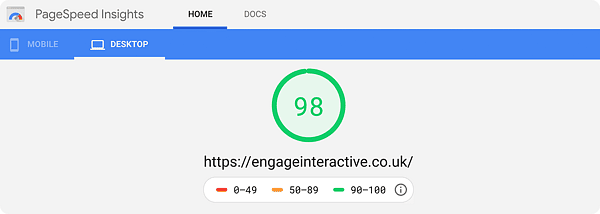
PageSpeed Insights gives your page a performance score from 0 to 100:
Score
Rating
What it means
90 to 100
Good
The page is performing well, though there may still be small improvements to make.
50 to 89
Needs improvement
The page has performance issues that could affect user experience.
0 to 49
Poor
The page has more serious performance issues that should be prioritised.
A good score is useful, but it should not be viewed in isolation. A page can score well and still have usability problems. It can also score lower because of things that are commercially or creatively important, such as interactive features, personalisation, tracking or rich media.
Context matters. Annoying, but true.
Do you need a 100/100 PageSpeed score?
Not always. A score of 100 is nice, but chasing it at all costs can quickly become a very technical way to miss the point.
The better question is: does the page feel fast, stable and easy to use for the people you actually care about? If your checkout is slow, your contact form lags, or your key landing pages take too long to load on mobile, those are worth fixing. If a carefully considered design feature costs a couple of points but helps the page do its job, ripping it out just to impress a testing tool may not be the smartest move.
Aim for strong performance, not performance theatre.
How to increase your PageSpeed score
The best way to improve your PageSpeed score is to work through the issues that have the biggest impact on loading, interaction and layout stability. Start with the basics, then move into the more technical fixes.
What to check
Why it matters
What to do
Large images
Heavy images are one of the most common causes of slow pages.
Compress images, use modern formats and avoid uploading images far larger than they need to be.
Unused JavaScript
Too much JavaScript can delay loading and make the page feel sluggish.
Remove unused scripts, split code where possible and only load what the page needs.
Render-blocking resources
Some files stop the browser from showing the page quickly.
Defer non-critical JavaScript and optimise critical CSS.
Third-party scripts
Analytics, ads, embeds and tracking tools can all slow things down.
Audit what is actually needed and remove anything that is no longer useful.
Fonts
Poorly loaded fonts can delay text display or cause layout shifts.
Use sensible font loading, preload key fonts and avoid excessive font weights.
Server response time
A slow server can hold everything else back.
Improve hosting, caching, database performance and backend efficiency.
Layout shifts
Moving buttons, images or text create a poor user experience.
Set image dimensions, reserve space for embeds and avoid injecting content above existing content.
Mobile performance
Mobile scores are often lower because devices and connections vary more.
Test mobile first and prioritise the pages that matter most to users.
The biggest gains usually come from fixing the obvious problems first. Huge images. Old scripts. Unused plugins. Overloaded templates. The usual suspects, looking guilty in the corner.
Core Web Vitals matter too
PageSpeed scores are useful, but they are only one part of performance. Core Web Vitals help measure how users experience a page in practice.
The three main Core Web Vitals are:
Largest Contentful Paint, which measures how quickly the main content loads.
Interaction to Next Paint, which measures how responsive the page feels after user interactions.
Cumulative Layout Shift, which measures whether the page moves around unexpectedly as it loads.
In plain English: does the page load quickly, respond properly and stay still while people are trying to use it?
That is what users care about. Nobody arrives on a website thinking, “I hope this has excellent lab data.” They just want the page to work.
How does PageSpeed affect your SEO and paid media performance?
PageSpeed is not just a technical health check sitting off to one side. It also feeds into two of the areas most businesses care about most: organic visibility and paid media efficiency.
For SEO, Core Web Vitals form part of the wider page experience signals Google factors into search ranking. Being fast will not single-handedly outrank a page with weak content, but a slow, unstable page can quietly undermine the technical foundations your organic strategy is trying to build, especially on competitive terms where every signal counts. If your content and technical SEO work is solid but your PageSpeed score is dragging, performance is often the missing piece.
For PPC, the effect can be even more direct. Landing page experience is one of the components Google Ads uses to calculate Quality Score, and a lower Quality Score typically means higher costs per click and reduced ad visibility for the same budget. If you are sending paid traffic to a slow or unstable landing page, you may be paying more for clicks that were already at risk of bouncing before the page had even finished loading.
Treating PageSpeed as part of your SEO and paid media strategy, rather than a standalone technical task, tends to pay for itself. A faster, more stable site supports organic visibility and paid efficiency at the same time, which makes it one of the rare fixes that benefits nearly every part of the marketing funnel.
What should you fix first?
Not every PageSpeed warning deserves the same level of panic. Start with the issues that affect important pages, important users and important actions.
Prioritise fixes in this order:
Pages that drive leads, sales, bookings or enquiries.
Mobile performance issues.
Failing Core Web Vitals.
Slow-loading images and videos.
Unused JavaScript or CSS.
Layout shifts that affect key content or buttons.
Third-party scripts that slow the page down without adding enough value.
That last point is worth repeating. If a script is not helping you measure, sell, support or improve something, it probably needs a very awkward conversation.
Make your website faster for actual humans
Improving your PageSpeed score is not really about making Google happy. It is about making your website easier to use, faster to trust and less likely to make people give up before they have done what they came to do.
A better score can be a useful sign that things are moving in the right direction. But the real win is a site that loads quickly, feels smooth and supports the user journey properly. That is where goodwebsite development makes a difference, because performance needs to be built into the foundations, not patched on later with crossed fingers and a plugin.
If your website is slow, clunky or throwing up PageSpeed warnings you would rather not look at, ourwebsites team can help you find the real performance issues and fix the ones that matter.
A good PageSpeed score is 90 or above. Scores between 50 and 89 need improvement, while scores below 50 are considered poor. That said, the score should be used as a guide, not the only measure of whether your website is performing well.
How do I increase my PageSpeed score?
To increase your PageSpeed score, start by optimising images, reducing unused JavaScript and CSS, improving server response time, fixing layout shifts, loading fonts properly and removing unnecessary third-party scripts. Start with the issues that affect your most important pages first.
Does a 100/100 PageSpeed score matter?
A 100/100 PageSpeed score can be nice, but it is not always necessary. A fast, stable and easy-to-use website is more important than chasing a perfect score. Sometimes the effort needed to move from a good score to a perfect score is better spent improving the wider user experience.
What is the difference between PageSpeed Insights and Core Web Vitals?
PageSpeed Insights is the tool that tests and reports on page performance. Core Web Vitals are specific user experience metrics that measure loading, responsiveness and visual stability. In short, PageSpeed Insights helps diagnose performance, while Core Web Vitals help show how users experience it.